Carnival Digital Debark: How to Schedule Your Debarkation in the HUB App
Getting off a Carnival cruise at the end of your vacation now includes a digital option for organizing your departure. Carnival’s Digital Debark feature allows guests to schedule their debarkation plans through the Carnival HUB app instead of relying entirely on the traditional end-of-cruise process.
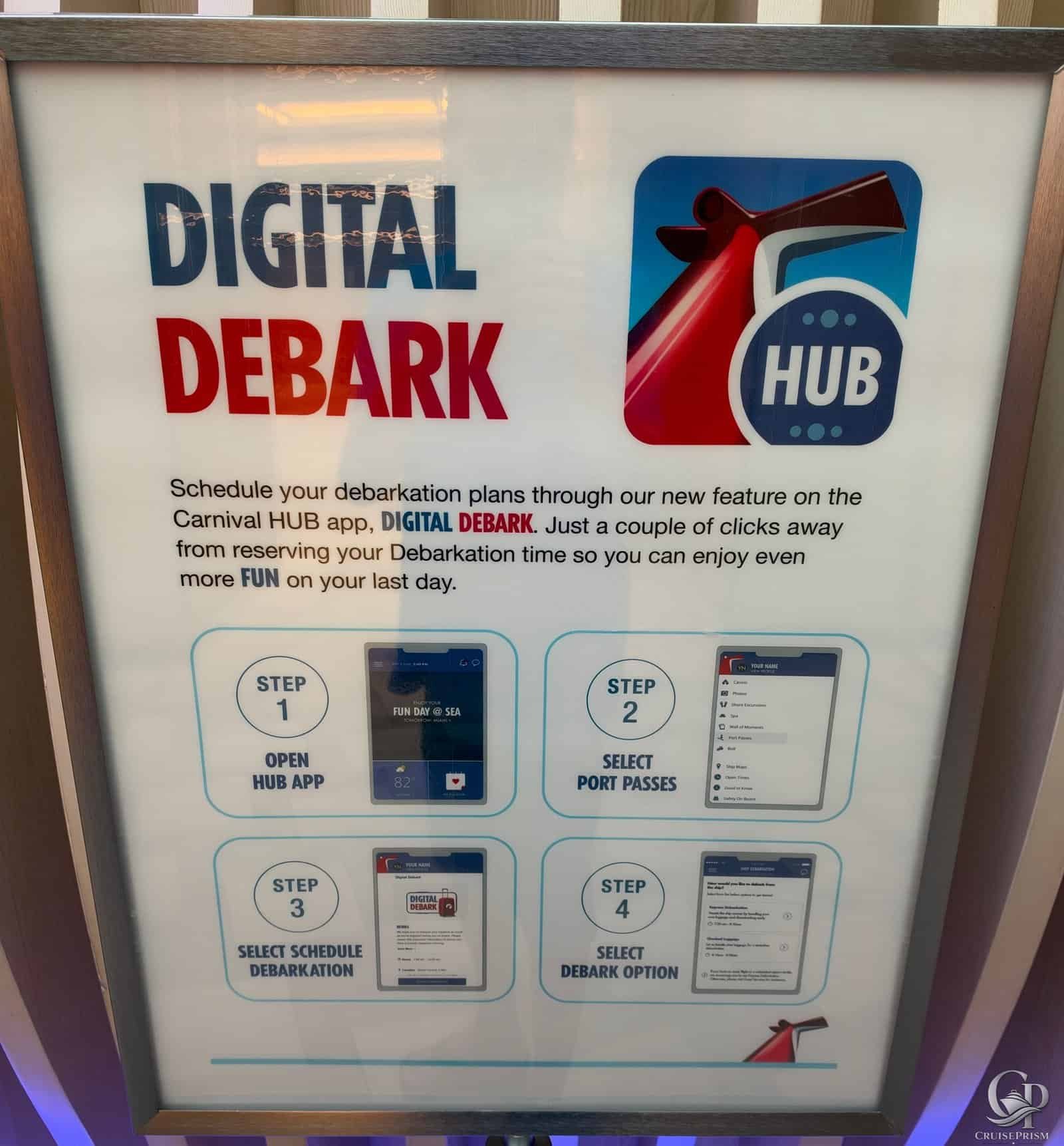
During my cruise, Carnival displayed instructions explaining exactly where to find Digital Debark in the app and how to select a departure option. The process shown onboard involves just four steps, all completed through the Carnival HUB app.
For more Carnival information, CruisePrism readers can also explore our Carnival Dining Menus, Carnival Drink Lists, and Carnival Onboard Guides for more information about restaurants, schedules and onboard activities.
What Is Carnival Digital Debark?
Digital Debark is a feature within the Carnival HUB app designed to help passengers organize their departure from the ship at the end of a cruise.
The onboard instructions describe it as a way to schedule your debarkation plans through the app and reserve your debarkation time with only a few selections.
This makes the HUB app useful beyond checking dining, activities, entertainment and other information during the cruise. Passengers should keep it available through the final morning because it can also play a role in the departure process.
How to Use Carnival Digital Debark
The instructions photographed onboard break the Digital Debark process into four steps:
- Step 1: Open the HUB app
- Step 2: Select Port Passes
- Step 3: Select Schedule Debarkation
- Step 4: Select a debark option
The important detail is that Digital Debark is accessed through the Port Passes section of the Carnival HUB app.
Once there, passengers can proceed to Schedule Debarkation and review the available debarkation choices presented for their cruise.
Where Is Digital Debark in the Carnival HUB App?
Based on the instructions displayed onboard, the navigation path is:
Carnival HUB App → Port Passes → Schedule Debarkation → Select Debark Option
That is useful to know because passengers unfamiliar with the feature might not immediately think to look under Port Passes when trying to organize their departure.
Carnival’s onboard sign specifically encourages passengers to use the feature to reserve their debarkation time.
Why You Should Check the HUB App Before the Last Morning
Debarkation is one of those parts of a cruise that is easy to ignore until the vacation is almost over. However, waiting until you’re ready to leave the ship isn’t the best time to start figuring out the procedure.
If Digital Debark is being offered on your sailing, check the Carnival HUB app before the final morning and review the available options.
The onboard instructions emphasize scheduling debarkation through the app so passengers can spend more of their final day enjoying the ship rather than worrying about departure arrangements.
It is also worth checking the ship’s daily program and any debarkation information provided onboard, since those materials may contain additional instructions specific to your sailing.
Digital Debark Does Not Mean Every Cruise Will Be Identical
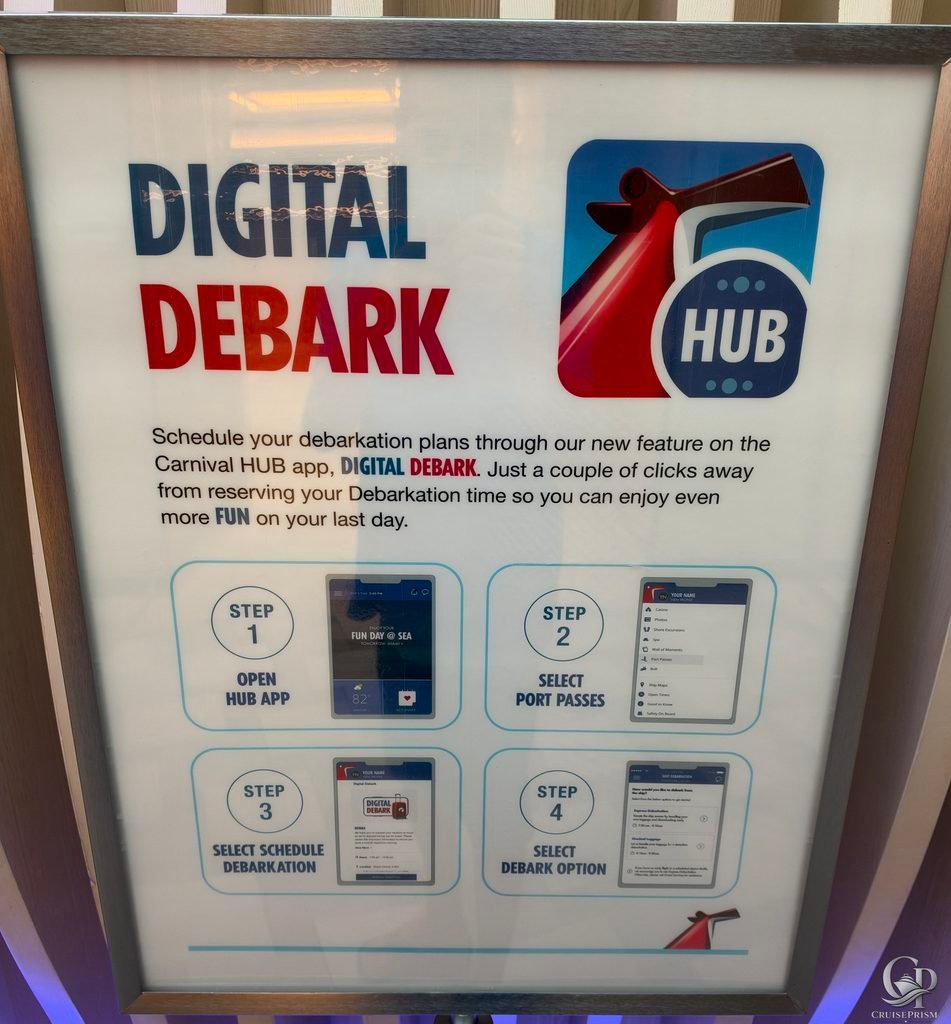
The photo shows the process Carnival was using during this particular cruise, but passengers shouldn’t assume every future sailing will present exactly the same options.
The specific choices available inside Digital Debark can depend on the debarkation arrangements for the sailing. Always follow the current instructions displayed in the Carnival HUB app and any information provided onboard.
The four-step process photographed here is nevertheless very straightforward: open the app, go to Port Passes, select Schedule Debarkation and choose from the available options.
Carnival Digital Debark Tips
If you’re sailing with Carnival and expect to use Digital Debark, a few simple tips can make the process easier:
- Keep the Carnival HUB app installed through the end of your cruise.
- Look under Port Passes for the Digital Debark option.
- Check the app before the final morning rather than waiting until you’re ready to leave.
- Review the available debarkation choices carefully before selecting one.
- Pay attention to any additional instructions provided onboard for your particular sailing.
- Keep checking the Carnival HUB app and onboard information in case instructions change.
Carnival Digital Debark FAQ
What is Carnival Digital Debark?
Digital Debark is a feature in the Carnival HUB app that allows passengers to schedule their debarkation plans digitally.
Where do I find Digital Debark in the Carnival HUB app?
According to the onboard instructions photographed during this cruise, open the HUB app and select Port Passes. From there, select Schedule Debarkation and then choose a debarkation option.
Do I need the Carnival HUB app for Digital Debark?
Yes. The onboard instructions specifically direct passengers to open the Carnival HUB app to access Digital Debark.
How many steps are involved?
The Carnival instructions shown onboard list four steps: open the HUB app, select Port Passes, select Schedule Debarkation and select a debark option.
Can I choose my Carnival debarkation time in the app?
Carnival’s onboard Digital Debark sign states that passengers can reserve their debarkation time through the feature. The specific options available should be checked directly in the HUB app during your sailing.
Should I wait until debarkation morning to use Digital Debark?
The onboard sign encourages passengers to schedule their debarkation plans so they can enjoy more of their last day. Checking the feature before the final morning gives you time to review the available options and any additional departure instructions.
Is Digital Debark the same on every Carnival cruise?
The basic process shown in the photo is straightforward, but passengers should follow the instructions provided for their specific cruise because available options and procedures can change.
Final Thoughts on Carnival Digital Debark
Carnival Digital Debark makes one of the least exciting parts of any cruise a little easier to organize. Instead of waiting until the last minute to figure out how you’re getting off the ship, passengers can use the Carnival HUB app to review and select their debarkation option.
The most important thing to remember is where to find it: HUB App → Port Passes → Schedule Debarkation → Select Debark Option.
It only takes a few steps, and taking care of it ahead of time means one less thing to think about as your Carnival cruise comes to an end.