Royal Caribbean VOOM Internet Prices & WiFi Package Guide
Staying connected at sea has changed dramatically in the last few years, and Royal Caribbean now offers Starlink-powered internet throughout its fleet through its VOOM service. Whether you simply want to check email and social media or need enough bandwidth for video calls, streaming and remote work, Royal Caribbean sells internet packages for the entire cruise as well as shorter 24-hour access.
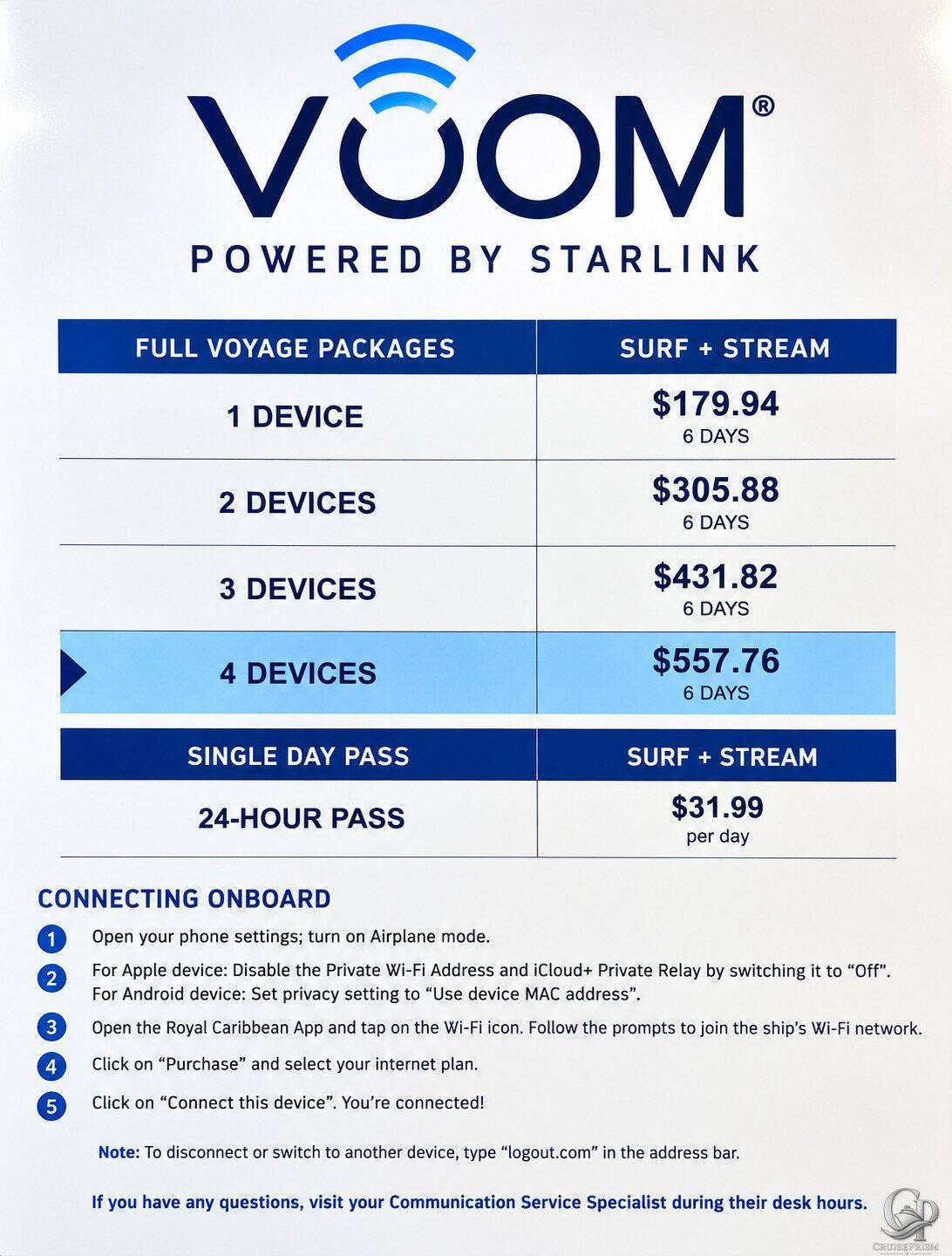
The onboard VOOM sign photographed for this guide shows a six-day Surf + Stream package starting at $179.94 for one device, with packages available for as many as four devices. It also lists a 24-hour internet pass for $31.99.
Royal Caribbean currently confirms that VOOM is available fleetwide, powered by Starlink, and capable of web browsing, messaging, video calls and streaming. The cruise line also confirms that internet prices vary by sailing, number of devices and when the package is purchased. For that reason, the prices photographed here are a useful real-world example of Royal Caribbean onboard WiFi pricing, but they should not be treated as guaranteed prices for every ship or sailing.
For more family cruise planning, CruisePrism readers can also explore our Royal Caribbean Menus, Royal Caribbean Drink Lists and Royal Caribbean Onboard guides.
Royal Caribbean VOOM Internet Prices
The photographed onboard sign shows pricing for a six-day cruise and offers full-voyage packages for one to four devices.
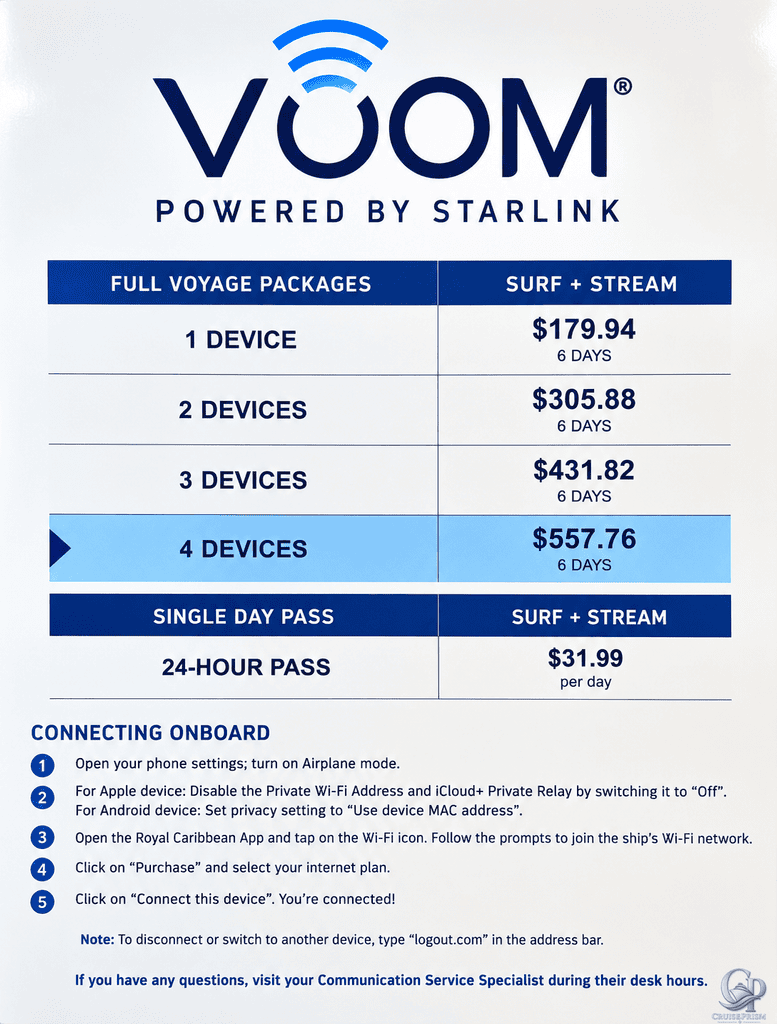
The prices displayed are:
- 1 device, 6 days – $179.94
- 2 devices, 6 days – $305.88
- 3 devices, 6 days – $431.82
- 4 devices, 6 days – $557.76
- 24-hour pass – $31.99
These are the prices displayed on this particular onboard sign. Royal Caribbean specifically states that internet prices vary, so passengers should check Cruise Planner for the actual price of VOOM on their sailing.
How Much Is Royal Caribbean WiFi Per Day?
The six-day packages make it easy to calculate the effective daily price shown on this particular sailing.
For one device:
$179.94 ÷ 6 days = $29.99 per day
The two-device package works out to $50.98 per day for both devices, while the three-device package is $71.97 per day and the four-device package is $92.96 per day.
The effective per-device price becomes cheaper as more devices are added to the same package.
The photographed 24-hour pass costs $31.99, making it slightly more expensive per day than purchasing the six-day one-device package at these particular onboard prices.
Royal Caribbean VOOM 1-Device Package
The photographed price for one device is:
$179.94 for six days
That works out to:
$29.99 per day
A one-device plan does not necessarily mean that only one particular phone or computer can ever use the internet. The important limitation is the number of devices that can be actively connected under the package at the same time.
The onboard instructions even explain how to disconnect one device and switch the connection to another.
That can make a one-device plan useful for someone who wants internet on a phone during the day but may occasionally want to switch the connection to a tablet or laptop.
Royal Caribbean VOOM 2-Device Package
The two-device package shown costs:
$305.88 for six days
That equals:
$152.94 per device for the cruise
or approximately:
$25.49 per device, per day
Compared with purchasing two separate one-device packages at the photographed onboard prices, the multi-device package provides a lower effective cost per device.
Royal Caribbean VOOM 3-Device Package
The three-device package costs:
$431.82 for six days
That works out to approximately:
$23.99 per device, per day
This could be useful for families or passengers who need several simultaneous internet connections.
Royal Caribbean VOOM 4-Device Package
The largest package shown on the sign provides access for four devices:
$557.76 for six days
That works out to:
$23.24 per device, per day
The four-device package has the lowest effective per-device rate among the full-voyage packages shown in the photograph.
Royal Caribbean currently confirms that its VOOM packages can accommodate up to four devices.
Royal Caribbean 24-Hour WiFi Pass
Passengers don’t necessarily have to purchase internet for their entire cruise.
The photographed onboard sign lists a:
24-Hour Surf + Stream Pass – $31.99
Royal Caribbean currently confirms that passengers who only need internet for a short period can purchase WiFi for one day.
The cruise line also notes that shorter onboard access is generally more expensive on a per-day basis than purchasing an internet package for the entire cruise.
A 24-hour pass could still make sense for someone who mostly wants to disconnect but needs internet for one particular day to work, make video calls or catch up on things back home.
Are These Royal Caribbean WiFi Prices Current?
The VOOM service itself, Starlink technology, multi-device packages and availability of one-day access are all consistent with Royal Caribbean’s current internet program.
The exact dollar amounts require an important qualification.
Royal Caribbean does not publish one permanent fleetwide VOOM price. The cruise line states that prices vary and recommends checking the internet package available for the specific sailing.
The prices in this guide should therefore be described as documented onboard Royal Caribbean VOOM prices, not as a universal price list.
Your sailing could cost more or less.
Is Royal Caribbean VOOM Powered by Starlink?
Yes.
Royal Caribbean currently confirms that every ship in its fleet offers VOOM internet through SpaceX Starlink.
Starlink uses a network of low-Earth-orbit satellites and has substantially improved the internet experience compared with older cruise-ship satellite systems.
The onboard sign reflects this directly with the prominent wording:
VOOM – Powered by Starlink
What Can You Do With Royal Caribbean VOOM?
Royal Caribbean says its current high-speed internet service supports many of the same activities passengers use internet for at home.
That includes:
- Browsing websites
- Sending and receiving email
- Messaging
- Posting to social media
- Video chatting
- Streaming music
- Streaming movies and television
- Remote work
Actual performance can still vary.
Satellite internet remains dependent on factors including the ship’s location, weather, network demand and satellite availability.
Does Royal Caribbean WiFi Work Everywhere on the Ship?
Royal Caribbean says VOOM internet is designed to provide connectivity throughout the ship.
That includes staterooms and public areas rather than requiring passengers to visit a dedicated internet café.
Performance can still vary by location, and temporary interruptions are possible because the connection ultimately depends on satellite communications.
Does Royal Caribbean WiFi Work at CocoCay?
Royal Caribbean currently states that VOOM internet packages also work at Perfect Day at CocoCay.
That is a particularly useful benefit for passengers who purchase internet for an entire cruise, since they can remain connected while spending the day on Royal Caribbean’s private destination rather than relying on cellular roaming.
Should You Buy Royal Caribbean WiFi Before the Cruise?
Usually, it is worth checking before you board.
Royal Caribbean explicitly recommends purchasing VOOM before the cruise because pre-cruise pricing can be cheaper than onboard pricing.
Internet packages frequently appear in Cruise Planner before departure, and promotional discounts can change over time.
That creates an important distinction between the prices documented in this guide and what you might actually pay.
The photographed sign represents onboard pricing from a particular sailing. Your Cruise Planner may offer a lower pre-cruise rate.
Should You Wait for a Royal Caribbean WiFi Sale?
Royal Caribbean frequently runs pre-cruise promotions across many onboard products, including internet packages.
If you know you’ll need WiFi, it can make sense to watch the price in Cruise Planner rather than assuming the first displayed price will remain unchanged.
The more useful comparison is the actual final price per day rather than the advertised percentage discount.
One Device vs. Multiple Devices
The multi-device packages can become significantly more economical when several people need internet simultaneously.
Based on the photographed six-day pricing:
1 device: $29.99 per device/day
2 devices: about $25.49 per device/day
3 devices: about $23.99 per device/day
4 devices: about $23.24 per device/day
That means a couple or family should compare the price of one multi-device package against purchasing several separate one-device packages.
Can You Share a Royal Caribbean WiFi Package?
A multi-device plan can be useful for families and groups because the package controls how many devices can be connected simultaneously.
For example, a four-device package can support multiple simultaneous connections rather than requiring four entirely separate internet purchases.
A one-device plan provides only one active connection at a time, but the photographed instructions show that passengers can disconnect and switch that connection to another device.
How to Connect to Royal Caribbean WiFi
The onboard sign provides specific instructions for connecting.
First, open your phone settings and turn on Airplane Mode.
For Apple devices, the photographed instructions say to disable Private Wi-Fi Address and iCloud Private Relay. For Android devices, the instructions say to set the privacy setting to Use device MAC address.
Next, open the Royal Caribbean app and tap the WiFi icon. Follow the prompts to join the ship’s WiFi network.
Select Purchase, choose an internet plan and then select Connect this device.
Once completed, the device should be connected to VOOM.
How to Switch Royal Caribbean WiFi Between Devices
The onboard instructions provide a particularly useful tip for passengers using a single-device package.
To disconnect or switch to another device, the sign instructs passengers to enter:
in the browser’s address bar.
After disconnecting the first device, the internet connection can then be activated on another device.
This means someone traveling with a phone and laptop doesn’t necessarily need to purchase a two-device package unless both devices need internet access at the same time.
Do You Need Airplane Mode on a Royal Caribbean Cruise?
Using Airplane Mode is important when sailing because it prevents your phone from automatically connecting to cellular networks while at sea.
The photographed Royal Caribbean connection instructions specifically begin with:
Open your phone settings; turn on Airplane mode.
After activating Airplane Mode, passengers can manually turn WiFi back on and connect to the ship’s network.
This can help prevent unexpected cellular roaming charges while still allowing the phone to use VOOM.
Can You Stream Netflix and Video With VOOM?
Royal Caribbean currently promotes VOOM as capable of streaming movies, television, music and online video.
The cruise line also promotes video calling and remote work as supported uses.
Starlink has made these bandwidth-intensive activities considerably more practical at sea, although passengers should still expect occasional differences from a home fiber or cable connection.
Can You Work Remotely on a Royal Caribbean Cruise?
Royal Caribbean specifically markets VOOM for remote work.
Email, web browsing, messaging and video calling are all supported uses.
Someone whose job depends on a completely uninterrupted connection should still recognize the limitations of satellite internet at sea. Ship position, weather and other conditions can occasionally affect service.
For routine work, however, Royal Caribbean’s current Starlink-based system is designed to handle considerably more than basic email.
Is Royal Caribbean WiFi Free?
For most passengers, VOOM internet is an additional purchase rather than a standard inclusion in the cruise fare.
There are exceptions.
Certain Royal Caribbean suite benefits and loyalty benefits can include internet access or internet-related perks, depending on the ship, suite category and passenger’s Crown & Anchor status.
Passengers should therefore check their existing benefits before purchasing a separate internet package.
Is Royal Caribbean VOOM Worth It?
That depends heavily on how much connectivity you need.
Someone who wants to completely disconnect during vacation probably doesn’t need a full-voyage package.
A passenger who only needs internet for one workday could consider a 24-hour pass.
For passengers who regularly use social media, stream entertainment, video chat with family or need internet for work, a full-voyage package is likely to be considerably more convenient.
Families should pay particular attention to multi-device pricing because the effective cost per device can decrease as additional connections are added.
Royal Caribbean VOOM Internet FAQ
How much does Royal Caribbean WiFi cost?
Prices vary by ship, sailing, number of devices and when the package is purchased. The onboard sign documented here lists a six-day one-device package at $179.94 and a 24-hour pass at $31.99.
How much is VOOM per day?
The one-device six-day package shown here works out to $29.99 per day. This is an example of onboard pricing, not a guaranteed fleetwide rate.
Does Royal Caribbean use Starlink?
Yes. Royal Caribbean currently confirms that VOOM internet throughout its fleet is powered by SpaceX Starlink.
Is VOOM available on every Royal Caribbean ship?
Yes. Royal Caribbean says VOOM is available fleetwide.
Can you buy Royal Caribbean WiFi for one day?
Yes. Royal Caribbean currently confirms that one-day internet access is available. The photographed onboard 24-hour pass is priced at $31.99.
Can you stream with Royal Caribbean VOOM?
Yes. Royal Caribbean says its current high-speed internet service supports streaming video and music as well as video calls, social media, web browsing and email.
Can you switch devices with a one-device VOOM package?
Yes. The onboard instructions specifically explain how to disconnect and switch the internet connection to another device. Only the permitted number of devices can be actively connected at the same time.
Is Royal Caribbean WiFi cheaper before the cruise?
It can be. Royal Caribbean recommends purchasing VOOM pre-cruise and says advance purchases often offer better pricing than buying onboard.
Does Royal Caribbean WiFi work at CocoCay?
Royal Caribbean currently states that VOOM internet packages can be used at Perfect Day at CocoCay.
Is Royal Caribbean WiFi included in the cruise fare?
Generally, no. Most passengers purchase VOOM separately, although certain suite and loyalty benefits can provide complimentary or discounted internet access.
Royal Caribbean VOOM Internet: What to Know Before You Buy

Royal Caribbean’s transition to Starlink has made VOOM far more useful for passengers who want to stay connected at sea. The service is available across the fleet and supports everything from basic messaging and email to video calls, streaming and remote work.
The onboard pricing documented in this guide shows how the cost can change depending on the number of simultaneous devices. On this six-day sailing, one device cost $179.94, while packages for two, three and four devices offered progressively lower effective prices per device. A 24-hour option was also available for $31.99.
Those exact prices should not be treated as permanent Royal Caribbean rates. VOOM pricing varies by sailing, and Royal Caribbean recommends checking Cruise Planner before departure because pre-cruise packages can be less expensive than buying internet onboard.
For most passengers who know they’ll need reliable internet throughout the vacation, checking the pre-cruise VOOM price before boarding is the best place to start.